
Planning to employ foreign nationals in the Republic of Liberia?
LEARN HOW TO OBTAIN A LIBERIA WORK PERMIT
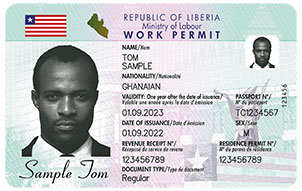
Organizations hiring foreign nationals in Liberia must ensure that their employees obtain both a valid Liberia Work Permit and a valid Residence Permit before starting work.
To apply for a Work Permit, organizations must submit the required documents through the official online platform available on this website. These include a valid Business Registration Form and a valid Residence Permit for each employee.
Once approved by the Liberian Ministry of Labour, the employee is officially permitted to work in Liberia.

How to apply
To apply for a Liberia Work Permit, the employee (i.e. applicant) must first obtain a valid Liberia Residence Permit.
Once this is obtained, follow these steps:
| STEP 1: CREATE AND REGISTER AN ACCOUNT |
Organizations applying for a Liberia Work Permit must first create an account on the official platform: Go to https://workpermit-liberia.com/. For registration, the organization representative must provide:
Additionally, the following documents must be prepared:
Once all required information is entered, click »CREATE ACCOUNT« to confirm and proceed. |
| STEP 2: ACTIVATE ACCOUNT |
After creating the account, an email with the activation link will be sent to the organization representative. The account must be verified by an official at the Liberian Ministry of Labour before further steps can be taken. |
| STEP 3: LOG IN TO THE ACCOUNT |
Once the account is verified, an email with a login link will be sent to the organization representative. Use it to access the platform. |
| STEP 4: SUBMIT APPLICATIONS |
In the dashboard, the organization representative can add batches of applications. Click »ADD NEW« to start a batch and enter details for each applicant, including:
The form can be saved temporarily but must be completed before submission. When all applications in the batch are ready, click »FINISH BATCH« to submit them for verification. |
| STEP 5: APPLICATION REVIEW & PAYMENT |
The Ministry of Labour reviews the applications.
Payment can be completed online or at a local bank. |
| STEP 6: PAYMENT INFORMATION |
Once the invoice is paid, go to account dashboard, enter the bill number for each applicant in their details section, and upload a scanned copy of the payment confirmation.
|
| STEP 7: BIOMETRIC ENROLLMENT |
Each employee (i.e. applicant) must report to the Ministry of Labour at Tubman Boulevard, Monrovia (Ellen Johnson Sirleaf Ministerial Complex) for biometric enrollment. During the visit, the employee must present their application number, which can be found in the dashboard under »View application«. The biometric enrollment process includes:
Enrollment is available Monday to Friday, from 9 AM to 4 PM. |
| STEP 8: WORK PERMIT COLLECTION |
Once the Work Permit is processed, the organization representative will receive an email notification. The permit can be collected at the Ministry of Labour, Tubman Boulevard, Monrovia (Ellen Johnson Sirleaf Ministerial Complex) during working hours (Monday to Friday, 9 AM – 4 PM). |
VALIDITY OF THE WORK PERMIT
The Liberia Work Permit is valid for one year. If an extension is needed, it must be renewed before the expiry date to ensure continuous validity.
One month before expiration, the organization representative will receive an email notification, and the renewal reminder will also be displayed in the account dashboard.
If the Work Permit is not renewed on time, an additional email notification will be sent after its expiration.
RENEWAL OF ORGANIZATION REGISTRATION
The organization representative must re-register the organization annually by resubmitting the Business Registration Form.
Information about the expiration will be displayed at the top of the account dashboard’s main page, and an email notification will also be sent to the organization representative.